For game developers
Ship the build, read the numbers, fix it.
One form in Studio takes the build you exported, and once the game is live you get plays, retention, and play rate per game.
- One form to upload
- Web builds from three engines, or any static site
- Retention included
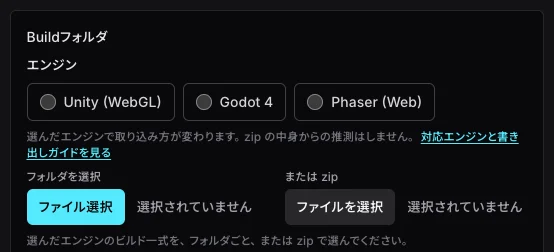
All we need is the build you exported
Registering the game and uploading the build are one submission on one Studio form. Sign in with a Google, Discord, or X account, or with a link sent to your email — there is no password to set.
One form, one submission
Title, description, visibility, engine, and the asset rights confirmation are all on the same screen, and a single submit both registers the game and uploads the build. The description, thumbnail, source URL, and reference resolution are optional.
Unpacked in the browser
Hand over the exported build as a folder or as a zip. The browser unpacks and compresses it on the way up, so there is no server for you to configure.
Unity needs four files
For Unity (WebGL), the four files in the Build folder (.loader.js, .framework.js, .wasm, .data) are enough, and index.html is not required. GameRush generates the player instead, which turns on the loading bar and prefetching.
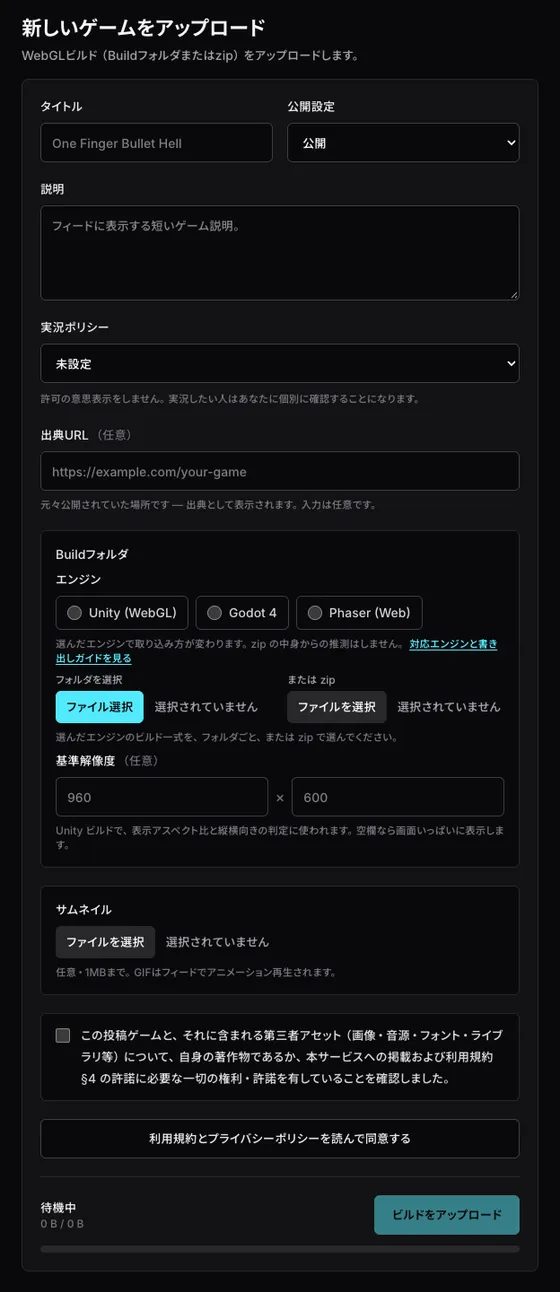
Supported engines, and what each export needs
Right now we accept web builds exported from these three engines, plus any static site with an index.html (Web). You choose one of the four in Studio; we never infer it from what is inside the zip.
Unity (WebGL)
The four files in the Build folder (.loader.js, .framework.js, .wasm, .data) are enough on their own. Any index.html in the build goes unused, because GameRush generates the player and enables the loading bar and prefetching. Brotli compression is recommended.
Godot 4
Rename the exported .html to index.html and put it at the root; this is the step people miss most often. Keep .pck, .wasm, and .js under the names the export gave them, side by side, and export with Use Threads switched off. A threaded build cannot meet the conditions we serve games under, so it will not run.
Phaser (Web)
Put index.html at the root and reference assets with relative paths (in Vite, set base to "./"). Ship Phaser itself inside the zip or bundle it; loading it from a CDN is not supported.
Web (HTML5)
Anything made with another tool can go up as an HTML5 bundle with index.html at the root. We use your index.html as-is, so reference assets with relative paths. Each HTML file can be up to 512KB, and the GameRush loading bar is not shown. For a Unity build, pick Unity instead.
HTML5 exports from other tools (for example GDevelop, Construct 3, or RPG Maker) may go up as Web. We have not tested each tool, though, so we cannot promise an export will run as-is, and some file types may not be accepted.
Upload requirements
- Build size
- Up to 50 MB
- File count
- Up to 2,000 files
- Thumbnail
- Optional, up to 1 MB (png, jpg, webp, gif). GIFs and animated WebPs animate in the feed. In addition to the main square thumbnail, you can set a 16:9 image for the wide cards on Home and the feed on landscape screens, and a 9:16 image for the feed on portrait screens (png, jpg, webp, gif), which are shown there instead. GIFs and animated WebPs animate there too.
- Visibility
- Public (shown in the feed), unlisted (anyone with the URL), or private (you and your collaborators).
Per-game numbers you can work from
Studio reports play rate and retention for every game you publish. Play rate and average playtime tell you how long players keep playing once they open your game, and Day 1 retention and 7-day return tell you whether players came back.
- Plays
- Players
- Playtime
- Average playtime
- Day 1 retention
- 7-day return
- Play rate
- Likes
- Comments
Plays
24k
38k landings
Play time
393h 28m
Avg. play time
59s
Active games
3
of 3
Daily plays
| Game | Plays | Players | Play time | Avg | Play rate | Day 1 retention | 7-day return | Likes | Comments |
|---|---|---|---|---|---|---|---|---|---|
| Sample game A | 11k | 7.2k | 159h 19m | 54s | 66% | 28% | 14% | 860 | 138 |
| Sample game B | 9.2k | 5.6k | 206h 23m | 1m 21s | 73% | 35% | 19% | 862 | 156 |
| Sample game C | 4.3k | 3.2k | 27h 45m | 23s | 47% | 11% | 5% | 139 | 26 |
Traffic sources breakdown
| Source | Valid plays | Landings | Avg. play time |
|---|---|---|---|
| Feed | 13k | 20k | 53s |
| Home | 3.6k | 6.1k | 1m 3s |
| Search | 2.7k | 4.2k | 1m 4s |
| Profile | 1.9k | 3.4k | 1m 6s |
| Share link | 1.4k | 2.7k | 1m 18s |
| Direct link | 1.2k | 1.9k | 59s |
The chart and table above are illustrations. Publish a game and your own numbers fill in here, in real time.
Five windows are available — 24 hours, 7 days, 28 days, 90 days, and all time — with a breakdown of where your players arrived from on the same screen.
A play is counted only when the session lasted at least 10 seconds; landings are reported separately.
Read the numbers, then replace the build
Daily plays are charted over time, so you can see the response and then replace the build on the same game. As a rule, a replaced build goes through our review once more.
From upload to live
Sign in, upload the build in Studio, and as a rule someone on the GameRush team checks it by hand. Until it is approved the game stays private and only you and your collaborators can play it. The result shows up in Studio and can reach you by email too, and a rejection comes with a reason you can read, fix, and submit again. Unlisted games are reviewed too, and replacing the build sends it back through review. Some creators we have designated as verified creators can publish their own games and replace their builds without review.
The SDK is optional
There is a UPM package for Unity, an addon for Godot 4, and a JavaScript library, with APIs for leaderboards, the public presence of other players, realtime multiplayer, an inbox, trading, sharing, the display language, and launch parameters. Adding it is optional; a game is listed and served without it.
Your rights
The copyright in your game stays with you, and GameRush acquires no rights in it.
We do not use your game as training data for machine learning or generative AI models, and we do not provide it to third parties for that purpose.
Listing is non-exclusive, and we put no limit on publishing the same game on other platforms.
You can unlist or delete your game at any time; deleting it ends the license going forward and distribution stops promptly, while clearing copies left in backups and caches takes a reasonable period.
Frequently asked questions
Does listing cost anything?
My engine is not on your list. Can I still publish?
Can I list a game I already publish on another site?
What happens in the review?
When the build is ready, Studio takes it.
Upload the build and your part is done. Once it is live, Studio is where you look for the next thing to fix.
Open Studio